AEC
How site managers use the 3dverse digital inspection platform to bring BIM on site in AR.
By replacing 2D printouts and office-bound models; verifying execution and catching deviations before they become costly rework.
Sector
AEC
Country
France
Use case
Augmented Reality
Device Agnostic
Accessible on tablet & mobile
No downloads
Connection to all systems (no duplicates)
10%
rework costs reduced
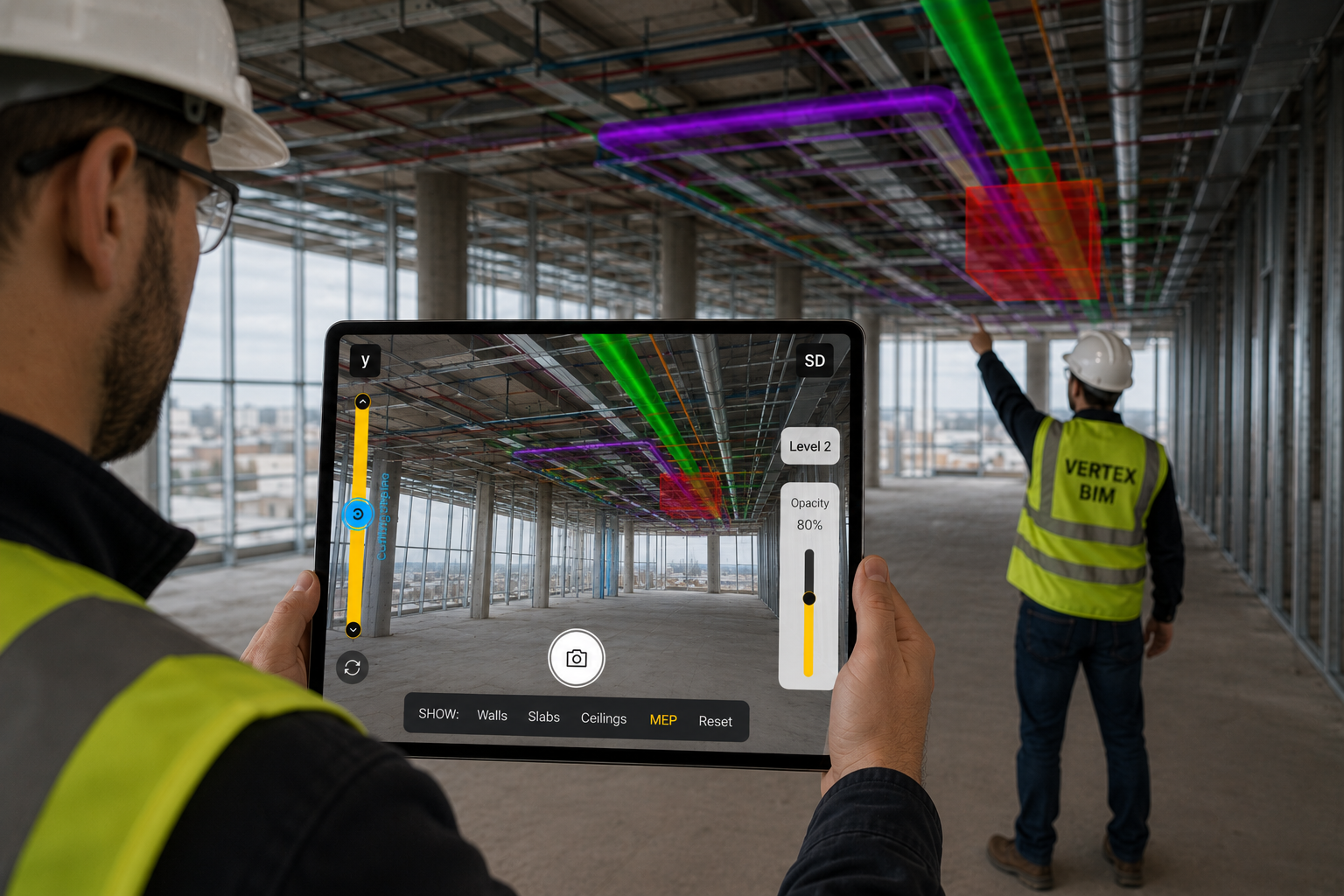
BIM in Augmented Reality, Right on the Job Site: How Vertex BIM and 3dverse Made the Digital Twin Accessible to Field Teams
A construction technology case study — AR BIM overlay powered by the 3dverse cloud-native digital twin platform.
On most projects, the BIM model is the single most expensive asset nobody on site can actually use. It lives on a workstation in the design office while the people pouring concrete and running conduit work from 2D printouts. Vertex BIM set out to close that gap — and partnered with 3dverse to prove that a contractor with nothing more than an iPhone could overlay the full BIM model onto the real building and check it in real time.
This is what we built, why it matters, and what it changes for construction teams.
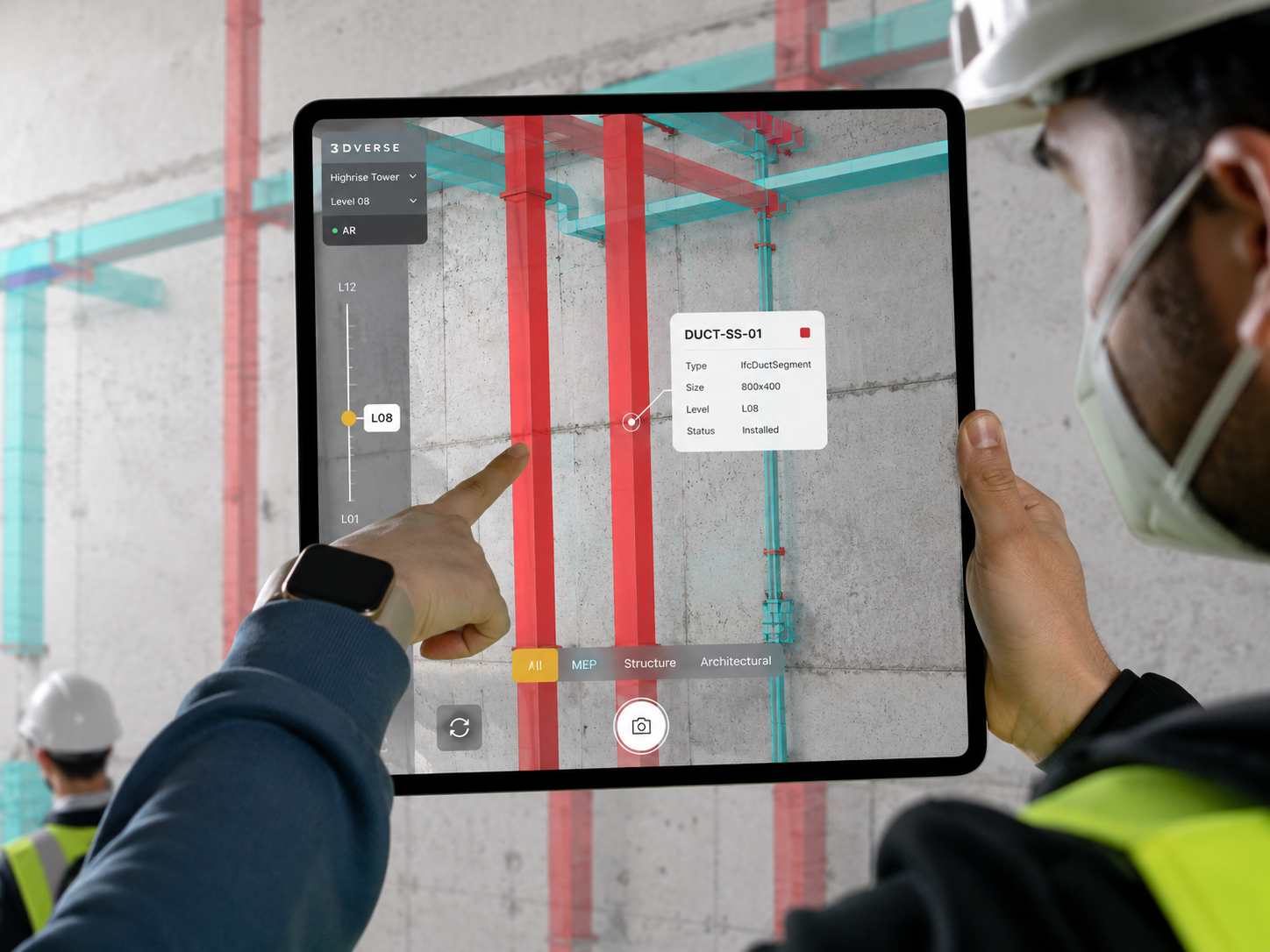
Who this is for
This case study will resonate with the people who feel the cost of the office-to-site gap every day:
General contractors and site managers who need to verify that what's being built matches what was designed — before it's buried in a wall.
BIM and VDC managers who invest heavily in coordinated models and want that investment to pay off on site, not just in design review.
Subcontractors and field crews (MEP, HVAC, plumbing, electrical) coordinating installations in tight, congested spaces.
Building owners and operators who depend on accurate as-builts and DOE handover for the entire operations, maintenance, and facility-management lifecycle.
Why it matters: the BIM model never reaches the people who build
BIM has become the standard for design and planning. On the job site, though, its potential goes largely untapped — and that gap costs real money.
The model is locked to the office. Traditional tools are heavy and require specialized hardware, so live access to the IFC model is effectively limited to workstations.
The people executing the work can't see it. The model is used during the study and coordination phases, but the crews actually installing the work rarely have it in front of them.
Deviations are caught too late. When the gap between plan and execution is only discovered after the fact, the fix becomes rework — and according to several industry estimates, rework can represent up to 10% of a project's total cost.
As-builts drift from reality. Without continuous verification on site, the DOE (handover documentation) doesn't always reflect the as-built condition. That unreliability flows straight downstream into operations, maintenance, and facility management for years after handover.
In short: the digital twin isn't being used where it would prevent the most damage — at the point of installation, in the field.
What we built: Digital Inspection with 3dverse
The idea is deliberately simple. A field operator points an iPhone at the work area and superimposes the IFC model onto the real construction site in augmented reality, then verifies conformity on the spot. No workstation. No specialized scanner. No app to install and maintain.
With just an iPhone, a team member can:
Overlay the IFC model onto the site in augmented reality, at true scale.
Verify conformity between plan and execution instantly, while the work is still accessible.
Identify deviations in real time — before they become critical and turn into rework.
It turns the digital twin from a design-office deliverable into an operational field tool.
How it works
The differentiator isn't the AR view — plenty of tools can put a model on a screen. It's where the model lives and how it gets there.
1. The model stays in the cloud as a single source of truth. With 3dverse's LiveLink rendering, the full IFC model is rendered in real time in the cloud and streamed to the device. The phone doesn't have to download, store, or process a stripped-down copy of the model — it receives a live, full-fidelity render. That means even large, complex models display with transparent materials and highlighted edges for readability, without being downsampled to fit a phone's memory.
2. The model is anchored precisely to the real world. The hardest part of any on-site overlay is locking the virtual model accurately into physical space. We use a reference-point alignment system:
The operator selects a recognizable feature in the model — a wall corner or an intersection.
They match that same point to reality through the phone's camera.
A triangulation step (one to three points depending on the situation) sets the correct scale and orientation.
Fine-tuning controls (translation and rotation) correct any residual offset.
The result is a reliable overlay that genuinely exposes the differences between plan and reality.
3. It runs on the device people already carry. No native app to deploy across iOS and Android. No headset. No on-site beacons or pre-installed infrastructure. A standard iPhone is enough — which is exactly what makes it deployable across a whole crew, not just a few power users.
On-site use cases
Catch clashes before they're built. Confirm that a plumbing run doesn't block the path reserved for electrical cabling — while there's still time to adjust.
Continuous quality control. Check dimensions and orientations as the installation progresses, not after it's closed up.
Field support without a dedicated workstation. Give crews direct, intuitive access to the BIM model on the device in their pocket.
Why a cloud-native approach changes the game
Most BIM augmented reality tools on the market today are conventional native apps: you import (and effectively copy) the model into the app, the device does the rendering, and model size and fidelity are capped by what that phone or tablet can handle. The app is a separate thing to install, update, and maintain alongside everything else in your stack.
A cloud-native digital twin flips that model:
Universal accessibility. A smartphone is enough — no specialized hardware, no headset.
One model, never a copy. Because rendering happens in the cloud, the model on site is the same model as the office — unique, collaborative, and always current. No stale exports drifting out of sync.
No fidelity ceiling. Large, heavy IFC models render in full detail because the heavy lifting happens in the cloud, not on the phone.
Operational efficiency. Immediate quality control means fewer office-to-site round trips and fewer surprises at handover.
Tangible economics. Deviations get corrected before they generate costly rework — and a continuously verified model means as-builts and DOE that operations teams can actually trust.
This is the core of what the Vertex BIM partnership demonstrates: keeping the model cloud-native isn't a technical nicety, it's what makes the BIM-on-site promise actually deliverable at scale.
The takeaway
With Vertex BIM, 3dverse showed that digital twins don't have to stay confined to design and simulation. They can become operational field tools — changing how job sites are checked, coordinated, and delivered.
It's more than a prototype. It's proof that augmented reality can finally make BIM useful where it matters most: on the job site.
Frequently asked questions
What is BIM augmented reality? BIM augmented reality overlays a 3D Building Information Model onto the real construction site through a device's camera, so teams can compare what was designed with what's actually being built, at true scale and in real position.
Do you need a special app or hardware to use it? No. This prototype runs on a standard iPhone with no specialized scanner or headset, because the model is rendered in the cloud and streamed to the device rather than processed locally.
How is this different from a conventional BIM AR app? Conventional native apps import a copy of the model and render it on the device, which caps model size and fidelity and creates a separate copy to keep in sync. The 3dverse approach keeps a single cloud-native model as the source of truth and streams a full-fidelity render to the phone.
How is the model aligned to the real site? Through reference-point alignment: the operator matches recognizable features (like a wall corner) between the model and reality, and a triangulation step sets the correct scale and orientation, with fine-tuning available to remove any offset.
Can it reduce rework? The goal is to catch deviations between plan and execution in real time, before they're built over — which is where rework cost (estimated at up to 10% of total project cost industry-wide) is generated.
See it on your own project
Want to bring your IFC model to the job site in augmented reality, from a single device? Contact the 3dverse team to talk through your project and see the platform in action.